Tiling

Tiling software for quotes and construction sites

Lay tiles, not piles of paperwork. Create NPK quotes, schedule jobs and crews, and track time, photos and additional work directly on site.
Caturix feature shown in the web and mobile app

Swiss tiling companies that work with Caturix

No items found.
From the office to the construction site

What Caturix solves for tiling contractors

Create quotes faster

Calculate tiling work with NPK or your own text and turn the quote directly into a project.
Caturix weekly scheduling view for crews and resources

Schedule jobs and crews

Assign employees and tasks clearly and keep last-minute changes in one place.
Available crew members in Caturix with employment type and profile photo

Keep plans and documents together

Store contacts, files, tasks and key information with the right job.
Available crew members in Caturix with employment type and profile photo

Document progress on site

Capture photos, checklists and changes directly on the construction site.
Project view screenshot

Track time without paperwork

Assign time entries to the correct project from the mobile app and reduce manual follow-up.
Screenshot of the task view in the mobile app

Capture additional work

Create digital work reports so every extra service can be billed.
Available crew members in Caturix with employment type and profile photo

From quote to digital work report

One workflow for office and site – using the same information from quote to report.

Calculate the quote

Calculate quotes with NPK items or your own descriptions and reuse the accepted work items.
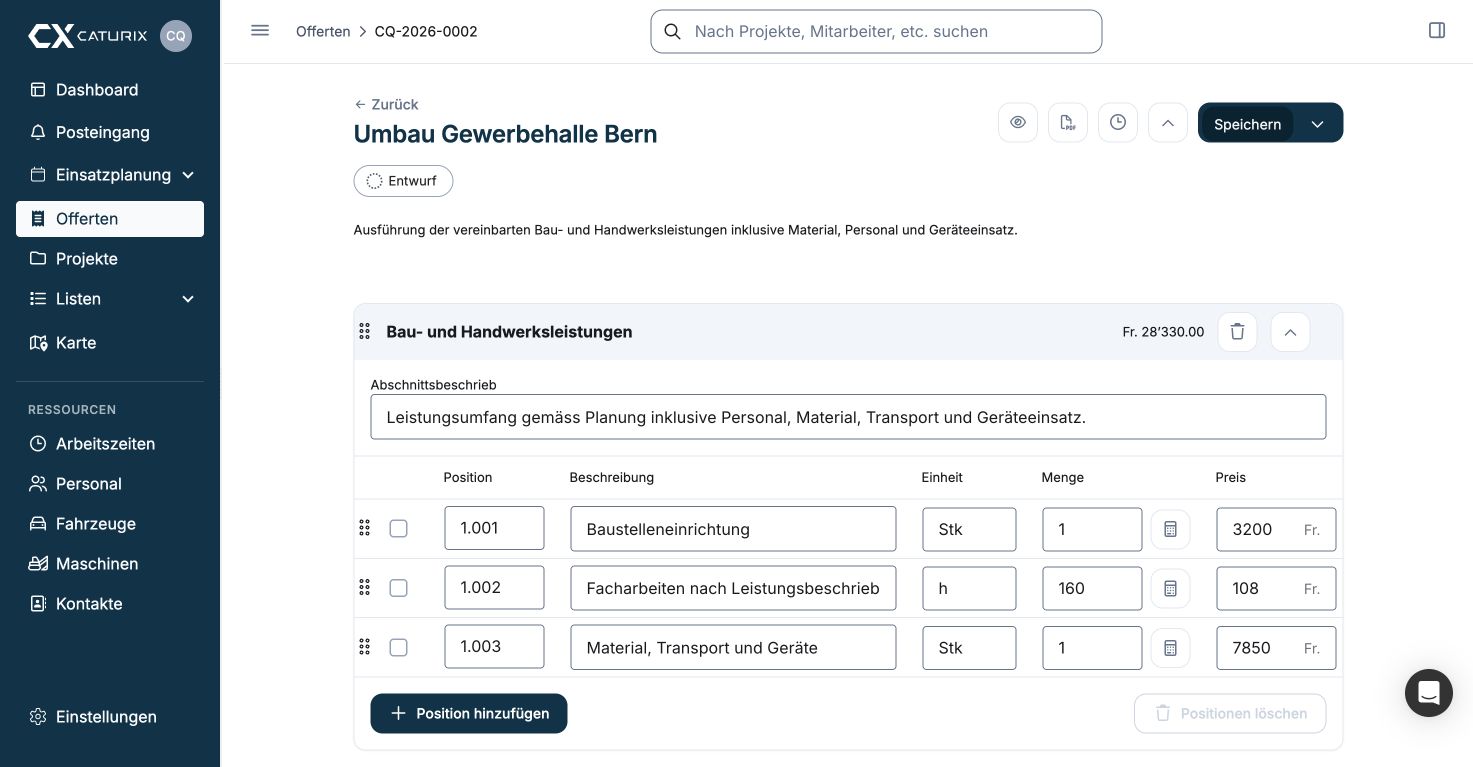
Current Caturix custom quotation editor for construction and trade businesses

Create the project

Carry work items, tasks, documents and contacts into the project without entering them twice.
Project view screenshot

Schedule the crew

Assign employees, vehicles and equipment to the right sites with drag and drop.
Weekly group planning view with validations

Document the work

Record working hours, photos, checklists and changes directly on site.

Prepare the additional-work report

Record additional work and use it to create clear digital time-and-materials reports.
Screenshot of the list of all tasks in the mobile app
Less administration

Why Caturix works on site

Fewer follow-up questions

Crews, tasks and changes are visible in one place, so site teams can check the current status without calling the office.

Less paperwork between office and site

Quotes, reports, hours, photos and documents stay digitally with the right project.

Record billable work while it’s fresh

Record variations, additional work and hours promptly, before they get lost in the daily workload.

Everyone works from the current schedule

Office and site teams share the same information about employees, vehicles, equipment and tasks.

Core features in detail

Project view screenshot
Project management

Keep track of your projects

Keep tasks, documents, contacts and progress together from quote to completion.
Track the key figures that matter
Create tasks for your team
Create digital work reports
Discover project management
Resource scheduling

Schedule crews and assignments

Schedule the week in a few minutes and keep every crew clear on where they are needed.
Schedule crews, vehicles and equipment with drag and drop
Keep a clear weekly overview
Create tasks and groups
Explore resource scheduling
Current Caturix custom quotation editor for construction and trade businesses
Quotes

Create quotes with NPK or your own descriptions

Prepare professional quotes faster and carry their data straight into the project.
Create free-text or NPK quotations
Manage variations, measurements and summaries
Discover quote management
Time tracking

Record working hours on mobile

Record and review working hours in the mobile app or web app without collecting timesheets later.
Record time by day and task
Review and approve submitted hours
Manage absences
Discover time tracking
Project overview with tasks, reports, quotes, and financial metricsWeekly group planning view with validationsCurrent Caturix custom quotation editor for construction and trade businessesWorking time tracking with a time clock

Frequently asked questions

Answers about quoting, scheduling, the mobile app, security and integrations.
How does Caturix schedule crews and resources for tiling?

Plan employees, crews, vehicles, equipment and tasks in one place and assign them to the right jobs. Office and site teams see the current schedule when plans change.

Can I create tiling quotes with NPK or my own items?

Yes. Build quotes with NPK items or your own text, calculate quantities and prices, and turn an accepted quote directly into the basis of a project.

What can crews do in the Caturix mobile app?

Crew members can view their schedule and project details, manage tasks, and capture working hours, photos, files and changes under the correct job.

How do I record working hours and additional work?

Time entries are assigned to the right project and task. Extra work, employees, vehicles, equipment and materials can be documented in clear digital work reports.

How does Caturix connect the office and the construction site?

Tasks, deadlines, contacts, documents, photos, quotes and reports stay together in the project, so office, project and site teams work from the same information.

Can I try Caturix before buying?

Yes. Create your account in about five minutes and try Caturix free for 14 days. You can also book a no-obligation demo to discuss your workflow first.

Construction terms explained

Useful terms for your everyday work on site – clearly explained.

Ready to spend less time on administration?

Try Caturix free for 14 days.